**To avoid third-party involvement and associated issues, we always recommend purchasing directly through our website.
Buying for yourself:
Standalone Game Purchase:
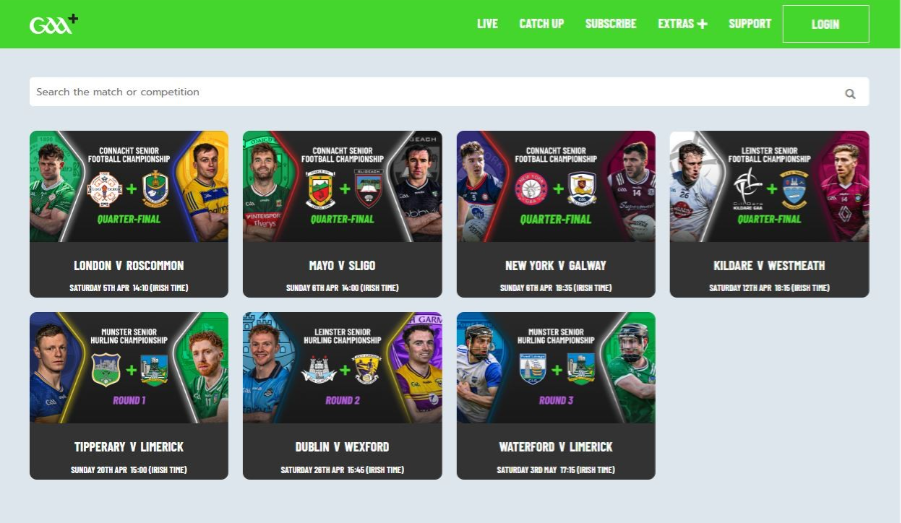
1. Go to the 'LIVE' or 'CATCH UP' section (depending on if the game you wish to watch is a live/upcoming or past game) and click on the image tile of the item of content you wish to purchase.
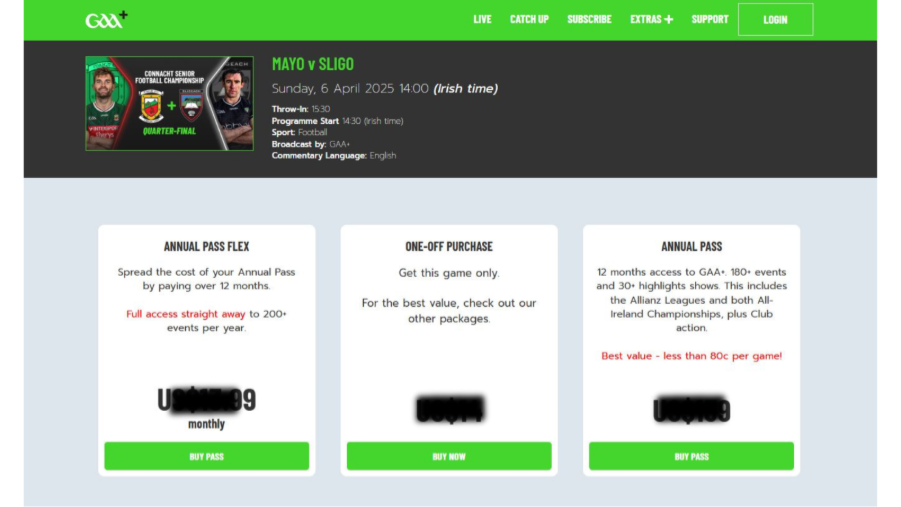
On the next page, you will be presented with all purchase options available in your territory. Select if you would like to purchase access to the item of content as a standalone/pay-per purchase or as part of a pass package.
Package Purchase:
1. Either go to the 'SUBSCRIBE' section and click 'BUY NOW' on the pass you wish to purchase (passes differ based on territory)
OR
Find the item of content you wish to purchase access to under the 'LIVE' or 'CATCH UP' sections (depending on if its a live/upcoming or past broadcast), click the image tile for the game and on the next page, select the pass package you wish to purchase.
2. Once selected, you will be redirected to the purchase page (below)
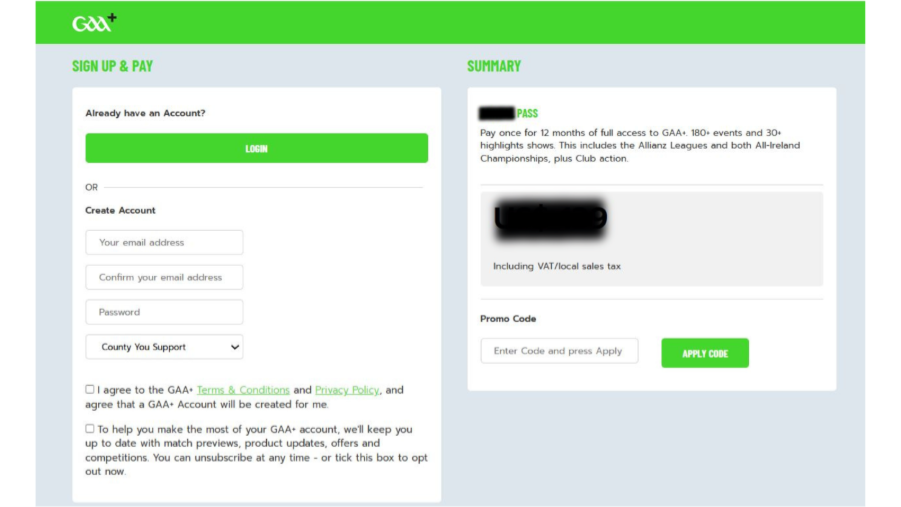
If this is your first time using GAA+, under 'Create Account' enter the requested information (email address, password, county you support) in the appropriate fields.
- Click the box to the left of the Terms and Conditions and privacy policy statement to accept them, this is mandatory.
- Click the box below that if you wish to to subscribe to receiving emails from our marketing team about upcoming offers, etc. This is optional, not compulsory.
If you are a returning customer, click the LOGIN button under 'Already have an account' and enter the email address and password associated with your GAA+ account in the appropriate fields.
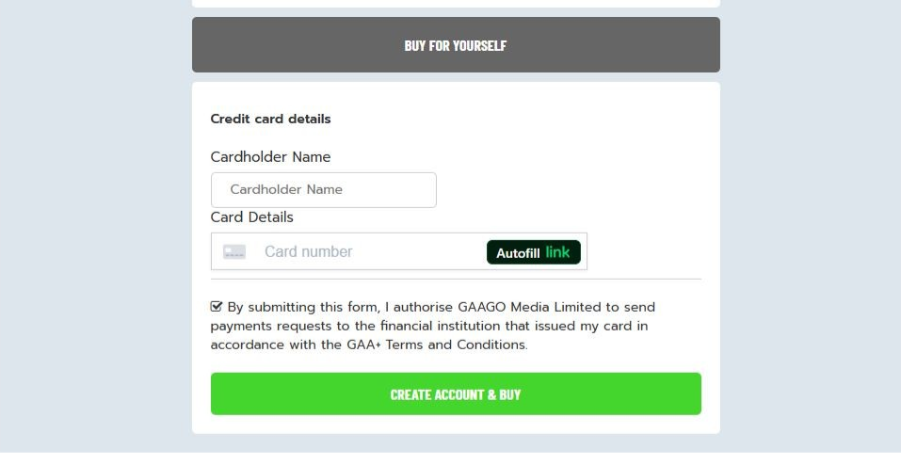
3. Scroll down to fill in your payment details. If you are a returning user, the payment fields may be auto populated from the last time you made a purchase but don't worry, you can alter these if necessary.
If you have a discount code, enter it into the 'Promo Code' field above, on the left of the screen, click 'APPLY CODE' and you should see the price displayed drop accordingly.
4. Once filled in, new customers click the 'Create Account & Buy' button, and returning customers click the 'BUY NOW' button.
*Please note in order for the purchase to go through successfully, you may be required to approve the purchase in your online banking app, in line with second authentification regulations put in place by your banking provider.
5. Once payment is successful, you will be sent proof of purchase via email. If you cannot see this in your main inbox, please check your spam/junk folder. This email is not needed to access the content, its merely a confirmation of the purchase.
6. To access content simply login on our website, mobile app, or on-tv apps (Roku, Apple TV, Google TV, Fire TV) using the email address and password used when registering your GAA+ account and you will have access to the content included in your pass package/game or individual programme you purchased.
Please note you will only have access to content once it becomes available to view on our service, for instance, if you purchase an upcoming game/programme, you will only be able to watch it once it goes live on our service.
An individual game purchase gives you access to watch that game live and on-demand up to 10 times a day for as long as the asset is available to access on our service (usually till the end of the season).
What cards can I use to pay?
Both credit cards and debit card payments from Visa, MasterCard, and American Express are accepted on the website. Prepaid credit cards may require a PIN number or have geographical restrictions attached - please contact your card provider to verify whether your prepaid card can be used without these restrictions.
We do not offer payment by Direct Debit, but you can pay for your subscription by instalments with the Annual Pass Flex.
Supported Platforms
Purchasing is currently supported:
1. Via our website
2. In the GAA+ iOS (Apple) and Apple TV apps
3. In the GAA+ Android (Google) and Android TV apps
4. In the GAA+ Amazon Fire TV app
Purchasing is NOT currently available through:
1. The GAA+ Roku app
2. The GAA+ Samsung app
3. The GAA+ LG TV app
Was this article helpful?
That’s Great!
Thank you for your feedback
Sorry! We couldn't be helpful
Thank you for your feedback
Feedback sent
We appreciate your effort and will try to fix the article