If you already have a GAA+ account, you can sign in using the email address and password associated with your
account.
Logging in on the GAA+ website
On a desktop or laptop:
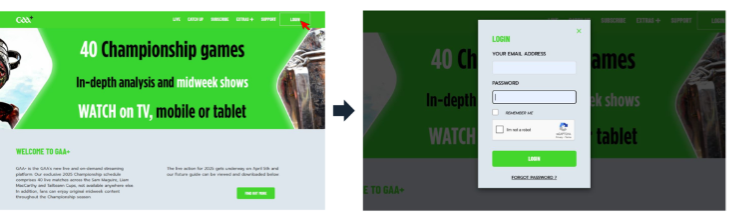
- Select LOGIN in the top-right corner of the website.
- Enter the email address and password associated with your GAA+ account.
- If you want your login details to be remembered on your device, select REMEMBER ME.
- Complete the “I am not a robot” security check. You may be asked to complete a CAPTCHA by selecting specific images.
- Select LOGIN.
- Enter Email & Password details
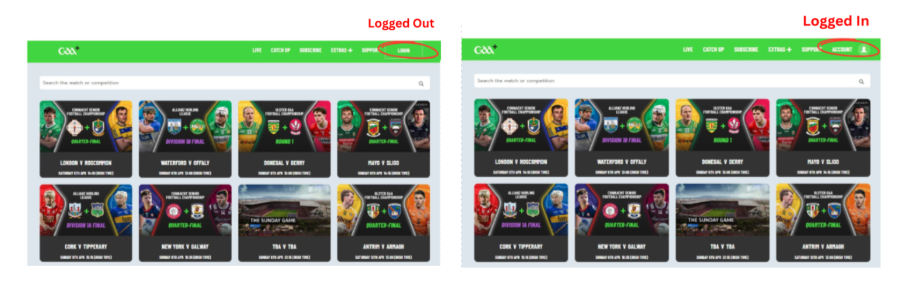
Once you are logged in, ACCOUNT will appear in the top-right corner instead of LOGIN.
On a mobile phone or tablet:
- Select the three-line menu in the top-right corner.
- Select LOGIN.
- Enter the email address and password associated with your GAA+ account.
- Complete the “I am not a robot” security check.
- Select LOGIN.
- Enter Email & Password details
Once you are logged in, a person/account icon will appear beside the menu icon.
Logging in on the GAA+ apps
GAA+ is available on supported iOS and Android mobile devices and on supported TV platforms, including Roku, Fire TV,
Apple TV, Google TV, Samsung TV and LG TV.
To log in:
- Open the GAA+ app.
- Select the cogwheel/settings icon in the top-right corner.
- Select LOGIN.
- Enter the email address and password associated with your GAA+ account.
- Select CONTINUE.
How do I know if I'm logged in?
You can check your login status from the device you are using:
Website – desktop:
If you see ACCOUNT in the top-right corner, you are logged in. If you see LOGIN, you are logged out.
Website – mobile or tablet:
If you see the person/account icon beside the menu icon, you are logged in.
GAA+ apps:
Select the cogwheel/settings icon.
- If the first option is LOGIN, you are logged out.
- If the first option is ACCOUNT, you are logged in.
- Select ACCOUNT to see the email address associated with the account you are currently using.
What if I'm having trouble logging in?
If you select LOGIN on the website but are not asked to enter your email address and password, and are only shown the “I am not a robot” security check, you may need to clear your browser's cookies and cache.
For step-by-step instructions, see Clearing Cookies & Cache (Browser).
I've forgotten my password. What should I do?
- Select Forgot Password on the GAA+ login page.
- Enter the email address associated with your GAA+ account.
- Select Send Email.
- Check your email for instructions on resetting your password.
If you don't receive the email or have difficulty resetting your password, contact the GAA+ Support Team at help@gaaplus.ie.
Where can I watch GAA+?
Once you have logged in, you can access GAA+ through the website, supported iOS and Android mobile apps, or supported TV apps.
The GAA+ mobile apps also support casting to a TV using Google Chromecast or Apple AirPlay.
Was this article helpful?
That’s Great!
Thank you for your feedback
Sorry! We couldn't be helpful
Thank you for your feedback
Feedback sent
We appreciate your effort and will try to fix the article